
With the theme and mood board sorted, I moved onto creating the diorama and assets. Before the workshop session, I was going to create a simple asset to get into the swing of things with creating a ammo clip instead it turned into a Lee Enfield rifle. As its going to be a big part of the diorama but also, I wanted to push myself as I haven’t made a low poly gun before. A plus to this is I learnt the Boolean tool which I had to research into, as I needed it for the trigger guard and the front sights. Overall the rifle turned out rather well with the low poly design, all I got left is to apply some basic textures which I will ask at the workshop session.
Assets:


With the rifle completed I moved onto making the environmental assets for the diorama. I started this in the first workshop session as I was doubting my idea if it would work, so with the session I could get feedback from fellow students and Chris and to see if the idea has been taken. With the feedback received was positive with the idea and no one is doing anything similar. Have this sorted I carried on with sorting out the size for the scene as I don’t want to set the bar to high and not achieve it. So, I went for a decent size where it shows all the aspects of WW1 with the trenches, No man’s land and the dugouts/bunker. With the assets, I went for the most iconic objects of the great war such as barbed wire, trees and soldiers everyday items. With making the assets I had no issues with them except trying to find more assets to fill my scenes as many of my shots felt empty. To solve this I done some research into the everyday lives of the British soldier which I found a perfect documentary film called “They Shall Not Grow Old” which I did a separate post on.
Diorama:
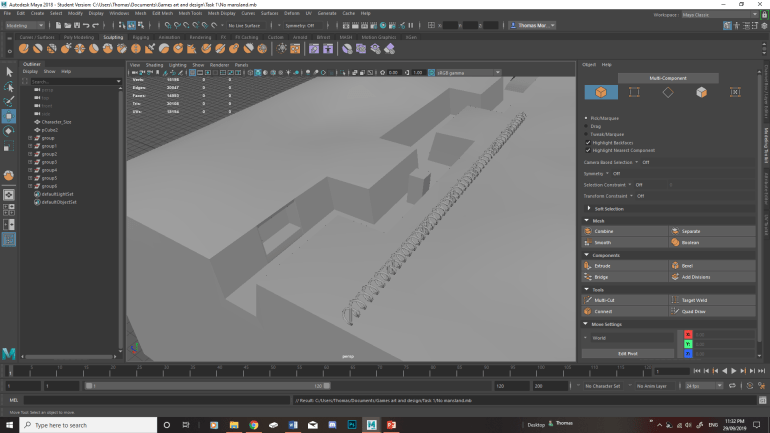
Carrying on with the diorama I started playing around with the sculpting tools to create my crater filled landscape which turned out alright. However with playing around with it, I discovered that I accidentally extruded a test trench and forgot to undo it. Which I can’t fix it as I am to far into it. So I am going to start over again which is a small set back but I feel like I could improve from the previous one. With importing the diorama into the unreal engine I found that I was limited by the amount of shots in my scene. So to fix this I added a dugout and some indents into the trenches which adds more to the scene.
Unreal Engine 4: Master Material and Diorama Lighting
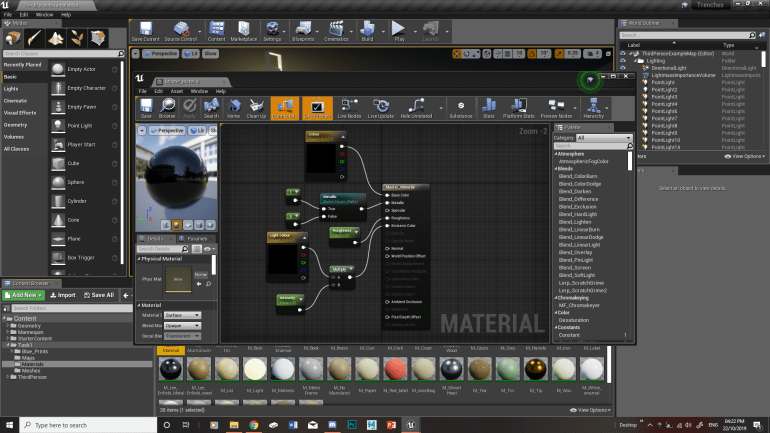
With the assets and scene made and imported into unreal and arranged for my scene. I then created the master material for texturing the assets. With making the master material I went for the basics such as the colour, roughness and metallic. These worked fine however I played around with the master material by adding in an emissive colour for my lanterns. This turned out fine for my scene giving off an eerie look to my dugout however I would like to play around with it in my spare time to make it flicker a bit.
With this sorted I began to play around with the lighting as I am going for a dark foggy atmosphere for the trenches. However, after placing my assets in my scene I noticed that I had issues with the shadows in my scene as some of the shadows didn’t look right as they wouldn’t cast the shadow of the asset properly. To solve this issue, I research into a variety of YouTube tutorials. Which I found this one (Below) useful as it would explain how lighting and shadows work in unreal. To solve this, I had to adjust the light mapping of the setting in the assets which improve the shadows shapes. However, it lowers the quality in the shadows luckily it fits in with the low poly theme.
Diorama High resolution Shots:
Here are a couple of rough shots from my scene where I played around with the camera placement. From this I found a couple of good shots however I felt like I didn’t have enough shots. So I added a dugout and indents into the trenches to add more to my scene. With my shots selected I presented them in the group tutorial to get feedback on my shots which I found very useful as all but one shot were fine. The One that wasn’t working is the shot of no mans land as it felt empty in the means of assets. To fix this issue I have added in more assets to liven up the scene such as a couple of helmets, rocks and branches.


